

Migration Scanner
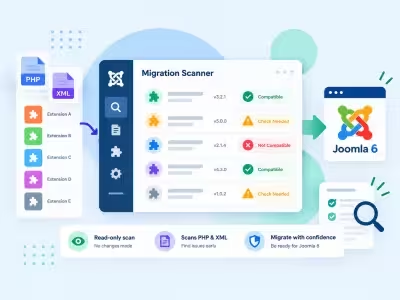
Free, read-only PHP and XML scan of enabled third-party extensions before you migrate to Joomla 6.
-
Free download Install it with no checkout
-
One-click updates New releases install from the Joomla administrator
-
Version 1.0.0 Updated 13 Oct 2026
-
Works with Joomla 4, 5 and 6
-
PHP 8.1 or later recommended
- 5.0 rating See the reviews
Features
What can Migration Scanner do for you?
Six feature areas, one install package for Joomla 4, 5 and 6.
-
Know What To Change
File And Line
- Exact pathsEach finding names the file, the line, and the replacement.
- Grouped APIsThe same call is grouped so you fix a pattern, not a pile of duplicates.
- SeverityCritical through low so you start with what will not run.
-
A Plan, Not A Dump
Worst First
- Dashboard KPIsAll extensions, will not run, needs review, ready.
- Do this firstA short list of the blockers on this site.
- InventoryComponents, modules, plugins, and templates ranked worst first.
-
Plugin Vs Rewrite
Compatibility Layers
- Aliases, legacy, assetsSee what still needs plg_behaviour_compat6.
- Will not runAPIs that the plugin cannot save.
- Host bannerCompat / compat6 state on this site, including Classes Aliases.
-
Safe On Staging
Read-Only Scan
- No executionThe scanner does not run extension PHP or SQL.
- Core skippedOnly enabled third-party extensions are inventoried.
- Chunked stepsFiles per step stay small on cheap hosting.
-
JSON And Printable
Reports You Can Share
- JSON exportIncludes bc_layer, bc_param, and removed_in.
- Site reportA printable view for agencies and developers.
- Per extensionScan one extension again after you edit it.
-
Administrator Component
Modern Joomla
- Joomla 4.4, 5, and 6PHP 8.1 or later.
- Free scannerOptional paid rewrite quote from Infyways inside Paid support.
- Native JavaScriptNo jQuery and no CDN.
Changelog
What's new
1 release. Updates install from the Joomla admin with a valid licence.
- First public release: read-only PHP and XML scan of enabled third-party extensions.
- Dashboard plan, extension inventory, and per-extension findings with file, line, and replacement.
- Compatibility-plugin layers (aliases, legacy classes, removed asset stubs) plus host banner for compat / compat6.
- JSON export and printable site report.
- Configuration for target Joomla version and files per step.
- Joomla 4.4, 5, and 6 with PHP 8.1 or later.
- Paid support in the administrator: free scanner, optional Infyways rewrite quote.
Docs & setup
Get up and running fast
Written guides for installing and configuring Migration Scanner, from first setup to the options that matter.
- Installation stepsOne install zip for Joomla 4, 5 and 6, installed from System, Install, Extensions.
- Configuration optionsThe settings in the guide, from first setup to the options that matter.
- Practical usage tipsShort examples you can adapt to your site.
Why buy here
Why JoomlaX
- Built, maintained and supported by one team Every product sold on JoomlaX is developed, maintained and supported by Infyways, building Joomla solutions since 2010.
- Ready for Joomla 4, 5 and 6 118 extensions support Joomla 5 and 6, and 114 support Joomla 4. Each product page lists the versions it works with.
- One-click Joomla updates Regular updates and feature improvements for licensed customers, delivered straight to your Joomla admin.
- Support from the developers Tickets go straight to the developers. First replies within 24 business hours.
All-access bundle
Unlock every JoomlaX extension in one plan
Get all 120 extensions, new releases, ongoing updates and full-time support. Bought one by one, a year of updates for every extension costs over $4,700.
-
Basic
Ideal for small projects and personal sites
$249/ 6 months
Save 91% · $2,900+ value
- Access to 120 extensions
- Access to new extensions during period
- 3 websites license
- 6 months support and updates
- Unlimited downloads and domain activations
- Full-time expert technical support
30-day money-back guarantee
-
Most popular
Premium
Best for growing businesses and web agencies
$349/ 1 year
Save 92% · $4,700+ value
- Access to 120 extensions
- Access to new extensions during period
- 5 websites license
- 1 year support and updates
- Unlimited downloads and domain activations
- Priority full-time technical support
30-day money-back guarantee
-
Developer
For professional developers and multi-client agencies
$749/ one-time
Pay once · keep forever
- Access to 120 extensions
- Access to all future new extensions
- Unlimited websites license
- Lifetime support and updates
- Unlimited downloads and domain activations
- VIP priority full-time technical support
30-day money-back guarantee
FAQ
Questions about Migration Scanner
Still unsure? Our support team is one ticket away.
Which Joomla versions does Migration Scanner support?
Migration Scanner installs on Joomla 4.4, 5, and 6. PHP 8.1 or later is required.
What does Migration Scanner do?
It inventories enabled third-party extensions on the site, token-scans their PHP, and checks XML manifests for a namespace. You get file paths, line numbers, replacements, and compatibility-plugin layers.
Does it change my extensions?
No. The scan is read-only. It does not execute extension PHP and it does not run extension SQL.
What files does it read?
PHP and XML in enabled non-core components, modules, plugins, and templates. Joomla core is skipped. JavaScript, CSS, and SQL files are not scanned in this release.
Should I run it on a live site?
Run it on a staging copy. The scan is read-only, but a large site can take several minutes and is easier to review off production.
What is the default target version?
Auto targets Joomla 6. Open Configuration to pick Joomla 4 or 5 if you are staging an upgrade to that version.
What file do I download from the store?
Download MigrationScanner_UNZIP.zip. Unzip it, then install the pkg_jxmscanner_*.zip inside from System > Install > Extensions.
Does it require jQuery?
No. Migration Scanner uses native JavaScript.
Is Migration Scanner free?
Yes. The scanner is free. If you want Infyways to rewrite an extension, open Components > Migration Scanner > Paid support and ask for a quote.
Help from the people who built it
- Documentation Installation, configuration and usage guides for this extension. Read the docs →
- Support portal Open a ticket with the developers. We reply to your first request within 24 business hours. Open a ticket →
- Live demos Try this extension on a live demo before you buy. Open this demo →
- Support policy What support covers, response times and how to get the fastest answer. Read the policy →
More like this
Related extensions
-
![]()
Module + Plugin
Right Click Disable
Joomla Extension to Disable Right Click on Mouse
v2.5 6,008 downloads
From $9
-
![]()
-
![]()
Plugin + Component
Easy Code Highlighter
Code Highlighter Plugin for Joomla
v2.0 3,523 downloads
From $9
-
![]()
-
![]()
-
![]()
-
![]()
-
![]()
-
![]()
-
![]()
Module
Randomizer
Show Joomla Modules and Articles Randomly in a Position
v1.5.0 3,114 downloads
From $19
-
![]()
-
![]()
Plugin
Typewriter
Joomla plugin for typewriter text effect with adjustable speed and cursor.
v1.3 4,398 downloads
From $9



