


Component
Utilities
Store Locator Pro
Google Maps store, dealer, and office locator for Joomla.
Instant access after purchase
One-click Joomla updates
Lifetime option available
30-day money-back guarantee
Works with
Joomla 4
Joomla 5
Joomla 6
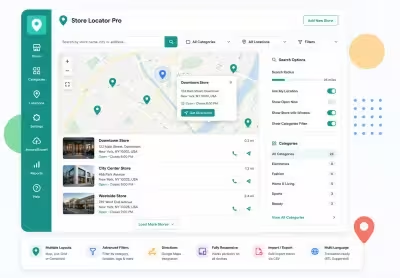
What can Store Locator Pro do for you?
Built for real Joomla sites
Store Locator Pro is a Google Maps store, dealer, and office locator for Joomla 4, 5, and 6. It is a JoomlaX-maintained fork of Sysgen Media Store Locator 2.6 with the same com_storelocator element and familiar Locations, Categories, Tags, and Markers workflow. Publish Responsive or Classic map menu items. Use radius search, featured filters, clustering, CSV import/export, batch geocoding, and Search Log.
Know what you are buying
JoomlaX Fork of Sysgen Store Locator
Transparent origin
Store Locator Pro is a maintained fork of Sysgen Media Store Locator 2.6 for Joomla 4, 5, and 6. Same com_storelocator element and familiar workflow, rebuilt with modern Joomla services.
Upgrade path
Sites moving from Joomla 3 Sysgen installs can upgrade in place after backing up and moving to Joomla 4.4+.
Find every branch
Google Maps Store Locator
Radius search
City, ZIP, or address search with miles or kilometers, custom radius list, country bias, and Google suggestions.
Geolocation
Optional "near me" button so visitors can search from their current position.
Central store data
Locations, Categories, Tags
Full location records
Name, address, phone, email, website, Facebook, logo, description, featured flag, category, tags, and custom marker.
Categories and tags
Filter the map with dropdowns or checkboxes. Marker icons can prefer tags or categories.
Pin catalog included
91 Custom Map Markers
Google micons pack
Install seeds 91 marker icons you can assign per location, category, or tag.
Markers manager
Add, rename, or replace icons under Components > Store Locator Pro > Markers.
Two map experiences
Responsive and Classic Layouts
Responsive layout
Modern map overlay search with filter drawer, clusters, and mobile-friendly controls.
Classic layout
Sysgen-style search form above the map with optional sidebar or bottom results list.
Map polish
Featured, Clusters, Directions
Featured filter
Highlight priority stores and optionally show only featured locations on load.
Clustering and directions
Google MarkerCluster or Spiderfier, plus Get Directions that opens Google Maps for the visitor.
Bulk store data
CSV Import / Export
Import
Upload a CSV to create or update locations in bulk.
Export
Download every location from the Import / Export screen for backup or spreadsheet edits.
Fill missing coordinates
Batch Geocoding
Address to lat / lon
Process locations that still need coordinates using your Google Geocoding API key.
Safer go-live
Import addresses first, geocode in batches, then publish the map menu item.
Ops and controls
Search Log and Options
Search Log
Review front-end queries to see what visitors type and which searches return results.
Global Options
API key, units, map height, cluster method, search limits, themes, and uninstall data retention.
Modern stack
Joomla 4 / 5 / 6 Ready
Current Joomla UI
Switcher fields, Bootstrap-friendly admin lists, and Helix-aware frontend CSS isolation.
Package install
One zip: pkg_storelocator_3.0.1.zip inside StoreLocatorPro_UNZIP.zip.
Docs & setup
Get up and running fast
Written guides for installing and configuring Store Locator Pro — from first setup to the options that matter.
- Installation steps
- Configuration options
- Practical usage tips
Pricing
Choose the plan that fits
Save more as you scale — longer access means a bigger discount.
Compatible with
Joomla 4
Joomla 5
Joomla 6
1 Year
Full year access with VIP support channel. Fastest response time & priority feature requests. Best value!
$49
Get 1 Year
30-day money-back guarantee
Download Access -
1 Year
Support -
1 Year + VIP Support Channel
3 Websites License
Unlimited
Downloads
VIP Support Channel
Priority Feature Requests
Fastest Response Time
1 Year Free Updates
30-Day Money Back Guarantee
Commercial Use License
Pay once
Lifetime
Lifetime access with dedicated support agent. Never pay again - unlimited updates & custom development support included.
$1,980
$99
You save 95%
Download
30-day money-back guarantee
Download Access -
Lifetime
Support -
Lifetime + Dedicated Support
Unlimited Websites License
Unlimited
Downloads
Dedicated Support Agent
Lifetime Free Updates
Feature Request Priority
Custom Development Support
30-Day Money Back Guarantee
Commercial Use License
Have questions about Store Locator Pro?
Frequently asked questions
Yes. Store Locator Pro is a JoomlaX-maintained fork of Sysgen Media Store Locator 2.6. It keeps the same com_storelocator element and familiar admin workflow, and is rebuilt for Joomla 4, 5, and 6.
Easy Store Locator is a separate JoomlaX product (com_easystorelocator + module) with Google Maps or OpenStreetMap. Store Locator Pro is the Sysgen-compatible component fork focused on Google Maps, classic and responsive map layouts, markers, categories, tags, CSV, and batch geocoding.
Yes, after you backup files and the database and upgrade the site to Joomla 4.4 or later. Install pkg_storelocator_3.0.1.zip. It replaces com_storelocator in place. Then confirm your Google Maps API key in Options and test your map menu items.
Enable the Maps JavaScript API and create an API key. Add the key under Components > Store Locator Pro > Options > Map. For address search and batch geocoding you also need the Geocoding API. Google Suggest uses Places when enabled in your Google Cloud project.
Download StoreLocatorPro_UNZIP.zip, extract it, then install pkg_storelocator_3.0.1.zip from System > Install > Extensions.
Create a menu item of type Store Locator Pro > Map. Choose the Responsive or Classic (default) layout, set menu options if needed, save, clear cache, and open the page.
By default you can keep data on uninstall from Options. Leave the keep-data setting enabled if you may reinstall later. Always backup before uninstalling.
A fresh install seeds 91 Google micons into the Markers catalog. You can assign them per location, category, or tag, and add your own marker images.
Still have questions?
More like this
Related extensions




Plugin
P
Typewriter
Joomla plugin for typewriter text effect with adjustable speed and cursor.
J4
J5
J6
All-access bundle
Unlock every JoomlaX extension in one plan
Get all 119 extensions, ongoing updates, and full-time support. Plans start at $99.
- Satisfaction guarantee
- Secure SSL payment
- Updates included
Store Locator Pro
30-day money-back
Download Now